What Is Google Built-in and What Does It Do?
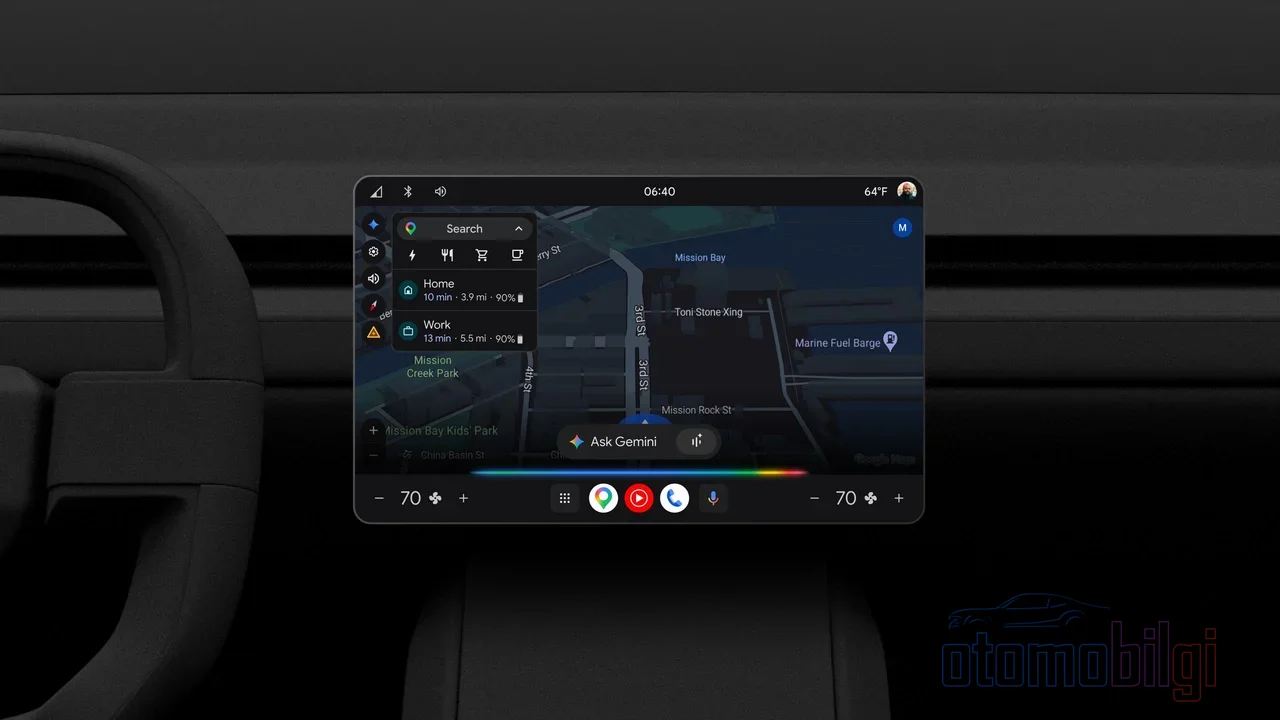
When Google Maps opens on the car's screen, most people jump to the same conclusion: it's already on my phone, what difference does it make? And that's exactly where things get interesting. Because of two cars that show Google on their screens, one is mirroring a phone, while the other houses the entire Google world within itself. The difference becomes clear on the day you leave your phone at home by mistake.
In this article, we untangle three concepts: Android Auto (mirroring), Android Automotive OS (an operating system running in the car) and Google Built-in, that is, Google Automotive Services (GAS). What does each one do, and what do built-in Maps, the Play Store and the voice assistant actually offer in real-world use? Let's get started.
Let's Clear Up the Confusion First: Are Android Auto, Android Automotive and Google Built-in the Same Thing?
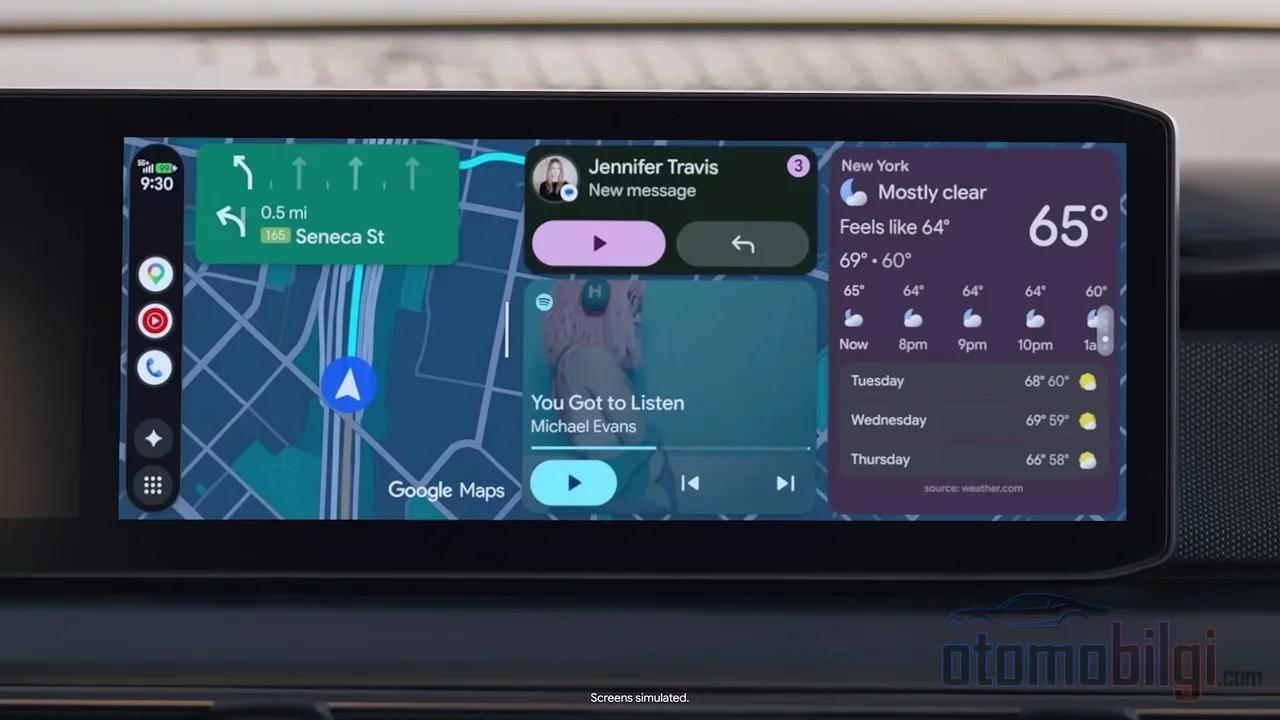
All three are associated with Google, but their functions are completely different. Android Auto is a platform that runs on your phone: it connects to the car's head unit via a cable (USB), the screen is mirrored, everything runs on your phone and it uses your phone's data. CarPlay works on the Apple side with exactly the same logic. In other words, the car merely serves as a screen and speakers.
Android Automotive OS (AAOS), on the other hand, is a completely different beast: a full-fledged operating system that runs on the car's own hardware, without a phone. What Android is to your phone, that's what it is to your car. In fact, it shares the same code base; it's not a separate copy. It was announced in March 2017, and the first series-production car with AAOS was the Polestar 2 (July 2020). The most recent version is Android Automotive 25Q4, released in January 2026.
Google Built-in is the marketing package layered on top of AAOS: a licensable set of services called Google Automotive Services (GAS). It includes Google Maps, Google Assistant (now Gemini) and the Google Play Store. So not every AAOS car has to have Google Built-in - BMW's OS 9, the Lucid Air and VW's One.Infotainment system are examples that run on an AAOS base without Google services.
| Feature | Android Auto | Android Automotive + Google Built-in |
|---|---|---|
| Where does it run? | On the phone, projected onto the screen | On the car's own hardware |
| Is a phone required? | Yes, via USB | No |
| Data connection | The phone's data | The car's own connection |
| App installation | No | From the Play Store, for the car |
| Integration with vehicle data | Limited | Extensive via the VHAL |
Why Does Built-in Google Maps Outshine the Phone?
Let me explain the difference between using Google Maps on your phone and using Maps built into the car with an analogy: one person looks at a map in their wallet, the other at the car's own internal map. The built-in version feeds the route with the car's data. The most tangible example is electric vehicles: a navigation system that knows your charge level, real range and battery condition can plan the journey accordingly. Maps mirrored from a phone can't do this because it doesn't know what's going on inside the car.
Another plus: navigation works even when the phone isn't connected. If the phone is left at home, the main unit uses the built-in Android Automotive Maps on its own. Maps also feeds safety-focused features such as road sign integration and adaptive driving support by providing data through the Vehicle Map Service (VMS). That is a layer mirroring systems cannot reach.
Highlights
- Android Auto mirrors the phone; Google Built-in runs inside the vehicle itself.
- The Polestar 2 became the first AAOS vehicle in July 2020.
- Gemini is active in vehicles with Google Built-in and in Android Auto; Assistant is being gradually shut down in Android Auto until March 2026.
- The Mazda CX-5 (2026) is the first Mazda model with Google Built-in.
What Is It Like to Download Apps from the Car's Play Store?
In vehicles with Google Built-in, the Play Store opens directly on the main unit and installs versions of your phone's apps designed for the car. So you download Spotify to the car, you do not clone your phone. The nice part is that these apps are adapted to the car screen and the driving environment.
But let's be honest: AAOS's app ecosystem remained limited for a long time; the number of vehicle-approved apps on the Play Store cannot compare with the phone. Google is trying to change that. In 2026, dozens of new mobile apps usable while parked arrived in vehicles; a redesigned Play Store and YouTube's background audio playback feature were also added. So the direction is right, but you should shop knowing the gap.
Hey Google Is Becoming Gemini: What Is Changing in the Voice Assistant?
The voice assistant in the GAS package has been modified to run in vehicle main units, and its biggest strength is its integration with vehicle functions: not just playing music, but being able to talk with the car's own settings. Being able to ask everything without taking your hands off the wheel is also a serious safety gain.
A major transition is happening here: Gemini is now available in vehicles with Google Built-in and has also arrived on Android Auto. Along with capabilities like adding a stop using natural language. The price of this is an old habit: Google Assistant's use in Android Auto is ending by March 2026 - Google first targeted the end of 2025, then postponed it to 2026 at the last minute. So the name you call your assistant with "Hey Google" will stay the same, but its brain is changing.
Who Is Switching to This System and Why, and Who Is Resisting?
The market is heating up fast. Hyundai Motor Group announced in December 2024 that it was adopting AAOS. The 2026 model of the Mazda CX-5 became the first Mazda with Google Built-in; BYD added it to some international models in 2025. In October 2026, Geely Holding signed a GAS agreement for the Geely, Lynk & Co, Proton, Riddara and Smart brands - from the end of 2027, we will see Maps, Play and Gemini on the dashboard of eligible vehicles outside China and the US. XPeng is also planning Google Play integration in early 2027.
On the other side, there is an interesting move: GM decided in 2023 to remove CarPlay and Android Auto from its future electric vehicles (it continues on internal combustion models). The justification given was stability issues with the mirroring systems, such as connection dropouts, poor rendering, and slow response. Structurally, it also makes sense: a mirroring system cannot access the vehicle's data, whereas a built-in system can.
The Subscription and Data Issue: Aren't These Services Free?
Here comes the part that might upset you. Chevrolet officially states that Google Maps does not require a subscription but does require a connected data plan. The app varies from brand to brand: 2026 Mazda CX-5 users report that the first 1-2 years are free, after which payment is required - this is not an officially confirmed rule, but user experience. Some GM users complain that Maps is unusable if the Connected Vehicle Plan is not paid for. Even if you do not pay for the subscription, using Android Auto or CarPlay can generally continue.
The privacy front should also be questioned: It is known that Google collects vehicle data through Android Automotive and that some automakers have resisted this data sharing. In a system that mirrors your phone, the data flow goes through your phone; with a built-in system, the car is an internet-connected device. Consumer Reports' question is spot on: why would you pay for Google in the car while the free Maps on your phone keeps working? The software updates side, however, is positive - for brands like Volvo, it is officially supported that updates come mostly OTA, that is, wirelessly.
Summary: What Exactly Does Google Built-in Change?
Let's gather the answer in a single paragraph: Google Built-in embeds Google services into the vehicle's own operating system; this way, Maps works with the vehicle's range and battery data, apps for the car are installed from the Play Store, and the voice assistant can manage vehicle functions - all without a phone. Android Auto and CarPlay, on the other hand, are bridges that mirror your phone to the screen: powerful, familiar, and free, but they cannot touch the vehicle's data.
My summary is this: if you want to reduce your dependence on your phone and make your car a truly smart device, Google Built-in is a meaningful step. But be sure to ask about the subscription terms before buying, because they are not the same for every brand. And if you say you will never connect your phone to the car, a good mirroring system will most likely make you more than happy. So which team are you on - the built-in system or the reliable cable?
Sources
- What is Android Automotive? - Android Open Source Project
- Android for Cars - Google for Developers
- Android Automotive - Wikipedia
- Cars with Google Built-in - Google
- Gemini is here for Android Auto - Google Blog
- Chevrolet with the New Google Built-In Feature - Chevrolet
- Software updates - Volvo Support US
- Android Auto vs. Android Automotive vs. GAS - Android Police
- GM to Phase Out Apple CarPlay, Android Auto in Future EVs - Guide Auto Web
- The Data Google Collects From an Android Car - autoevolution