How Safe Are Park Assistants?
Share This Page
Are automatic parking assistants really safe? Short answer: extremely helpful when used correctly, but they are an assistant that never takes over the responsibility behind the wheel from you. These systems, which measure the area around the vehicle with ultrasonic sensors and cameras, can perform parallel and perpendicular parking maneuvers; however, due to sensor blind spots, dirty bumpers, and unexpected pedestrians, the driver must be ready to take over at any second.
Highlights
- The first parking assistant 2006 model Lexus LS was introduced in the US with
- An active parking assistant takes over the accelerator, brake, and steering, but in most systems the gear selection remains with the driver
- Parking sensors are designed to warn about low obstacles on the ground (fire hydrant, bicycle, railing)
- Reverse maneuvering sensors are systems not designed for pedestrian detection
- Snow, mud, ice, or excessive paint thickness can impair sensor perception
How Exactly Does a Parking Assistant Work?
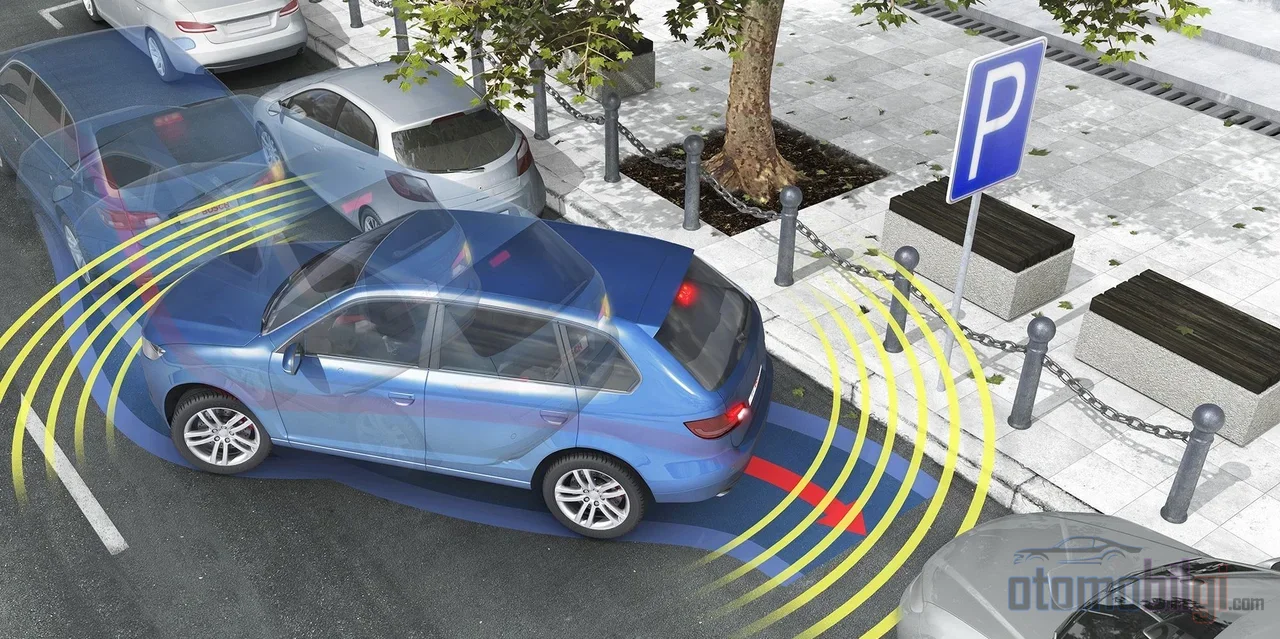
Think of it this way: a bat flying at night sends out sound waves and finds its way from the returning echo, right? The ultrasonic sensors on the car's bumper do exactly the same thing. They emit a sound wave, receive the wave that reflects off an obstacle and returns, and calculate the distance within milliseconds. That's why you hear the beeping speeds up as you get closer to the bumper; when the sound turns into a continuous tone, you are now very close.
Most systems work with ultrasonic sensors positioned on the front and rear bumpers; some models also add sensors on the sides. In addition to ultrasonics, electromagnetic sensors behind the bumper, radar sensors at the corners of the vehicle, and of course cameras can come into play. While cameras give you visual context, ultrasonic sensors measure precise distance. This duo complements each other's shortcomings in dark parking lots or in corners where visibility is blocked. So how much of this hardware is yours, and how much is the car's? This is where the system type becomes decisive.
Passive, Active, and Remote Parking: Three Different Assistants
Not every parking assistant does the same job. Some just yell, some take the steering wheel out of your hands, and some park the car by themselves while you wait outside the vehicle. To clarify the difference, let's put the three types side by side:
| System Type | What Does It Do? | What Remains With You |
|---|---|---|
| Passive parking assistant | Gives audible and haptic warnings; beeps become more frequent as an obstacle approaches | Steering, accelerator, and brake |
| Active parking assistant | Takes over the steering, acceleration, braking, and depending on the model, gear positions | Usually the gear and general supervision |
| Remote parking assistant | With the smart key nearby, the car parks itself while the driver waits outside | Monitoring the process and stopping it if necessary |
The remote parking feature is designed especially for tight spaces where there isn't even room to open the door. For example, one manufacturer's system detects the parking spot with front, side and rear ultrasonic sensors and can handle steering, acceleration, deceleration and gear changing entirely on its own. Sounds like magic, I know. But there's another side to the coin: even active systems don't take over every step. A test procedure prepared by a safety organization for an active park assistant clearly states that although throttle, brake and steering are in the system during the maneuver, using the gear selector manually remains with the driver. So the system says "assist" and it really is just assisting; you're still the captain.
Let's also make a note in history: the first manufacturer to bring the park assistant idea to life was Toyota. Its entry into the US market came with the 2006 model year Lexus LS . Since that day, the systems have advanced so much that they can now reverse into perpendicular spots, automatically pull out of parallel spots, and measure a parallel parking spot centimeter by centimeter with ultrasonic sensors.
How Reliable Is the System in Parallel and Perpendicular Parking?
Parallel parking seems to be the area where systems are most comfortable. While the car slowly passes along the curb, ultrasonic sensors scan for a suitable gap; you shift into reverse and confirm the system, and the steering takes care of the rest. In tight spaces, the system may not settle for a single maneuver and can go back and forth; some systems signal "done" with a beep and an on-screen display when they finish the job. Even the organization that prepares the test procedures measures performance with 13 different scenarios covering parallel and perpendicular parking - which alone is proof that these systems are taken seriously.
But perpendicular parking complicates things a bit. There are people on driver forums who aren't satisfied with the system: one user wrote that in perpendicular parking the car needs to be very close to the row of neighboring vehicles, otherwise the system is almost useless. Another Ford owner explained that parallel and perpendicular parking take neighboring vehicles as reference, and if the gap is too wide the system may not behave properly. The anecdotes in social media groups are similar: some say they often had to press the brakes and found the success rate low. This is entirely user experience of course, not a scientific measurement - but we can't ignore a recurring pattern: a system that can't find a reference point makes worse guesses than you do.
The academic side is interesting too: it is emphasized that millimeter-level precision in tight parking spots can make the difference between success and failure. Manufacturers are pushing further; solutions such as the garage park assistant, which makes tight garage maneuvers easier with a single touch, are being offered. In short, the technology is advancing but it's not "press and it happens": even while the system is doing its job, your foot should stay close to the brake pedal.
Is the Park Assistant the Same Thing as a 360-Degree Camera?
No, and knowing this difference is very important. A 360-degree surround-view camera combines the images from multiple cameras around the vehicle to create a composite view of the surroundings on the screen, as if you were looking from above. It is super useful at low speeds: is your approach angle right, is the car parked straight, is there a narrow passage behind - you see it all at a glance. The parking assistant does much more: the parking assistant performs the maneuver, the 360 camera only provides the view. The camera shows you, the assistant turns the steering wheel. One is your eyes, the other your hands.
Drivers who confuse the two may think "the parking assistant is broken" in their camera-equipped car. Yet the camera will never take over the steering; it is not part of its job description, let alone its task. The ideal use is to use both: hear the distance with the sensor beeps, see the position with the 360 camera image, and if the system is truly active, leave the maneuver to it - but keep your hand on the gear lever.
Pedestrians and Low Obstacles: Where Are the Sensors' Blind Spots?
Here comes the most serious part of the matter. Ultrasonic parking sensors are an active technology designed to warn the driver of objects behind the vehicle; but one study clearly states: these sensors are not intended to detect the presence of a pedestrian. So a child running behind you in a parking lot is not a design target of the system. Pedestrian detection is the job of collision avoidance systems where radar, camera and different sensor types are combined; the combination of multiple technologies provides the greatest benefit, and pedestrian detection capability alone can vary over a very wide range in parking sensors.
When it comes to low obstacles, the situation is somewhat better: parking collision warning systems exist precisely to warn the driver about obstacles such as a fire hydrant standing on the ground, a parked bicycle, or a bollard. Still, you should not expect zero errors. Tracking occluded (out-of-sight) pedestrians is only possible with radar-camera integrated systems, and even solutions like BMW's active pedestrian protection are limited to issuing warnings above certain speeds. The result? Keep looking through the window and at the mirrors when reversing. Camera and sensors are support, not a substitute.
Golden Rules for Using the System Safely
Manufacturer manuals insistently repeat this point, and they are right. Chevrolet's official manual states that the system stops operating if the driver's door is open, the seat belt is not fastened, the trunk is open, or the maximum permitted speed is exceeded. Similar warnings appear in every manual: stay in the vehicle during the maneuver, and always be ready to take over the steering wheel and brake harder if necessary. To use the system safely, the controls you must have are:
- Stay in the vehicle throughout the maneuver, fasten your seat belt, keep the door closed
- Be ready to override the steering wheel and change gears at any moment
- Do not hesitate to brake harder than the system when necessary
- Keep watching the mirrors and looking out the window during the maneuver
- If you see a pedestrian, cyclist, or low obstacle, stop immediately; do not try to persuade the system
A statement from Mercedes makes the same summary: the ultimate responsibility for safe vehicle operation lies with the driver. Toyota adds its part: the parking assistant is no substitute for safe driving, stay alert even while the system is working. You see, all manufacturers say the same thing: the assistant helps you, but it won't be held responsible on your behalf.
Why Do Sensors Get Confused? Dirt, Snow and Calibration
If the system suddenly "goes crazy," no panic - first check the bumper. When sensors are covered with snow, mud, dirt or ice, detection is impaired; if the bumper is damaged or has been repainted with a thick coat, the sensor starts reading the world incorrectly. Common causes of failure include sensor malfunctions and blockages, electrical/software errors, and physical damage. If you see warnings like "Service park assist system," "Park assist blocked," or "Rear parking assist unavailable" on the console, the system is trying to tell you something - listen to it.
Then there's the calibration issue, which most drivers never even think about. When a sensor is removed and reinstalled, initialization, angle testing and calibration are typically required; a system that is uncalibrated or incorrectly calibrated can malfunction and create an unsafe situation. For example, it's known that in one model, after a rear camera repair, the camera needs to be reconnected to the ADAS system. So if you've had bumper work done or been in a collision, don't forget to have the parking assistant checked too.
So the Conclusion: Should You Use It or Not?
Use it, but don't take your eyes off the road. The parking assistant is a mature technology that significantly reduces stress, especially in tight urban areas - it has been evolving since 2006 and becomes more capable with every model year. It's usually reliable in parallel parking, sensitive to vehicle position in perpendicular parking, and limited by design when it comes to pedestrian detection. Your job is simple: treat the system like an assistant, not a chauffeur. Keep the sensors clean, take the warnings seriously, and be ready to take over at any moment during the maneuver. Then the answer to the question of how safe this system really is also becomes clear: the more alert you are, the safer it is.
Sources
- Understanding ADAS: Parking Assistance
- Active Park Assist Draft Test Procedure Validation (2021)
- How to Use Automatic Parking Assist
- Ultrasonic Parking Sensors for Automated Parking
- What Is a Surround-View Camera?
- Park assist
- Garage park assist
- An Overview of Autonomous Parking Systems (2025)
- Pedestrian Detection During Vehicle Backing Maneuvers (2019)
- Exploring the Promise and Limits of Pedestrian Detection (2019)
- Parking Collision Warning
- Active pedestrian protection
- Why is my parking assist not working?
- Park Assist? Self-Parking? Yes, Please!