OTA Updates: How Is Your Vehicle Remotely Renewed?
Share This Page
OTA, or "over-the-air" updating, is the wireless renewal of your car's software: like an update arriving on your phone, the car downloads new software over Wi-Fi or a cellular connection and usually installs it while parked. This way, many things like navigation, battery management, and safety systems can be updated without going to a dealership. So what happens behind the scenes, how long does it take, and what should you pay attention to? Let's take a look.
Highlights
- Updates can take anywhere from a few minutes to 90 minutes and the vehicle is mostly unusable during this time.
- Modern cars can contain up to 100 million lines of code - roughly seven times that of a Boeing 787.
- Most updates go to the media system, with the ADAS (driver assistance) computer coming in second.
- Polestar 2 increased its efficiency by about 10% through OTA.
- Updates fixing a safety recall must be free by federal law.
How exactly does an OTA update work?
Technically, here is the deal: The many computers inside the vehicle (called ECUs) store software in permanent memory chips. An OTA update means these chips are reprogrammed wirelessly. There are two types: SOTA software updates (navigation, infotainment, climate control, etc.) and FOTA firmware updates (things that directly control hardware, such as powertrain and battery management).
The process generally follows these steps: First, the car connects to a server via Wi-Fi or 4G/5G and downloads the update package. Then the package is installed at a time when the vehicle is not in use. The system verifies the installation and the relevant computer restarts. Like the update on your phone, but a bit more serious - after all, the car is a machine that carries you!
How is safety ensured?
Smart question: "What if the software coming from the internet is fake?" In a well-designed system, only software signed with the manufacturer's cryptographic key can be installed. In other words, you don't open a package delivered to your door without checking its special seal. Manufacturers also use encryption, authentication, and regular security patches.
Which systems are updated, and which are not?
Here is a big truth: Today, the overwhelming majority of updates are made to the head unit, i.e., the media and navigation system. The second most frequent recipient is the ADAS computer - the one that manages driver assistance systems like lane keeping and emergency braking. By contrast, sending post-installation updates to deeply embedded systems like the powertrain or electric vehicle battery management is still rare.
The reason is simple and a bit frustrating: Most ECUs manage a single function and are developed by different suppliers. One brand's CEO put it quite plainly:
The problem is that the software is written by 150 different companies and they don't talk to each other.
A modern car can contain up to 100 million lines of code; on the Boeing 787 Dreamliner, that number is 14 million So cars are now more "software-defined" than airplanes. But part of this code was not designed to be updated - especially in traditional (non-electric) vehicles. Safety certification requirements also complicate things; every software change needs to prove its safety.
The good news: New-generation modular architectures allow infotainment, ADAS and battery management to be updated independently of each other. Some manufacturers are also separating the media system from the critical ADAS computers; this way an infotainment update cannot accidentally break the safety system. Brands like Mercedes, on the other hand, distribute everything from ADAS to entertainment via OTA through their own operating systems. So architecture is the main thing that determines the OTA experience.
How long does an update take and how often does it arrive?
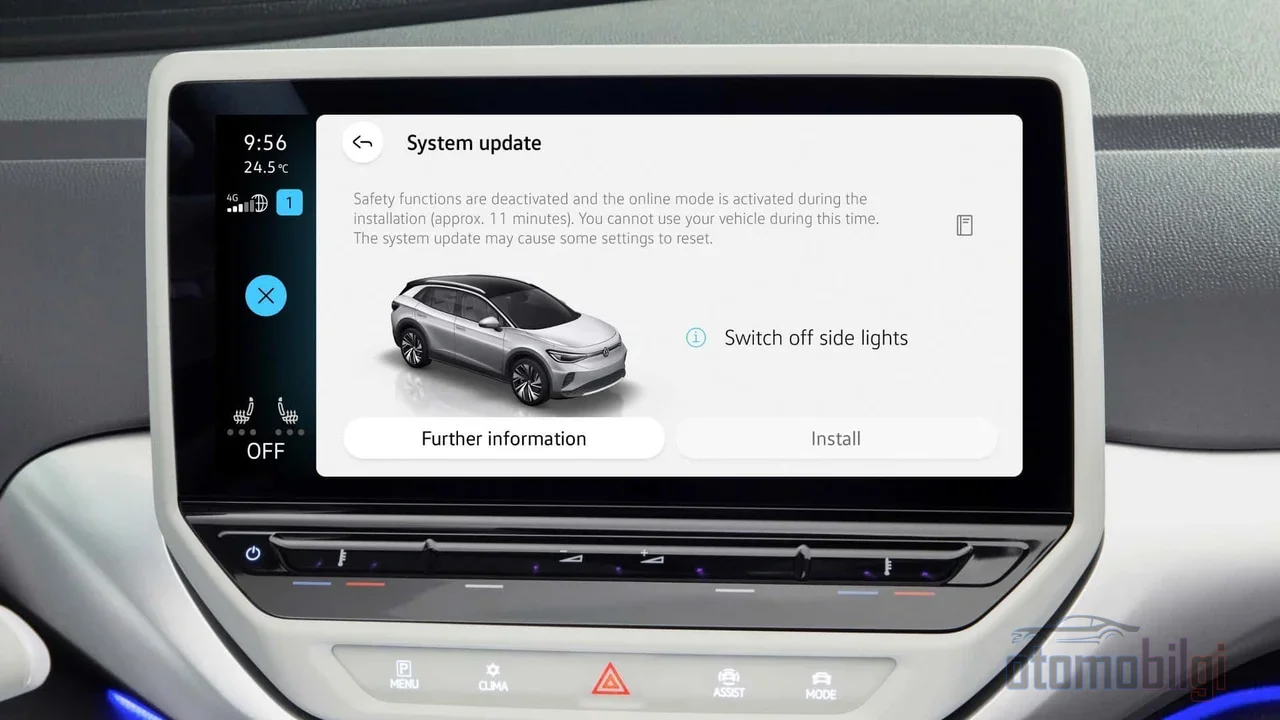
The duration varies a lot: Some updates take a few minutes, some up to 90 minutes. In most cases the car must be locked and must not be started during the update - meaning during that time the car is not yours, it belongs to the software. Electric vehicles have an advantage here: They can power up all systems without starting the engine. Updates in fuel-powered vehicles may require more active involvement.
The frequency issue is also interesting. Most updates are rare: 1-2 times a year. User forums say they see 3-4 updates a year on some models. A far-from-zero example: Polestar 2 installing the update requires at least 40% battery charge and about 90 minutes. Tesla, meanwhile, usually offers large or very old updates only over Wi-Fi - downloading huge packages over cellular data is both expensive and unreliable.
| Topic | What you need to know |
|---|---|
| Duration | Between a few minutes and 90 minutes; the car is mostly unusable |
| Frequency | Mostly 1-2 times a year; 3-4 on some models |
| Most frequently updated | Media/navigation system, followed by the ADAS computer |
| Least frequently updated | Powertrain and deeply embedded systems |
| Connectivity | Wi-Fi or cellular 4G/5G; large packages usually Wi-Fi |
And does it really work? Yes: Polestar 2's efficiency was increased by about 10% via OTA, and the 15th update added the YouTube app. The Tesla Model 3 brake issue found in 2018 was also solved with a wireless update that shortened the braking distance. There are also manufacturers issuing real recalls via software updates - Ford, GM, Mercedes-Benz, Porsche and Stellantis have done it. Even Lucid enabled Android Auto and Apple CarPlay compatibility later via OTA. The best part of this is: Your car does not freeze in the state it was in on the day you bought it.
Why is every brand's OTA experience different?
What sets Tesla apart from the others is not just speed, but architecture. The reasons why traditional manufacturers are late are clear: lack of software expertise, overly complex vehicle architectures and safety concerns. You cannot turn a factory that has been running for decades on computers from different suppliers that do not talk to each other into a "software company" overnight.
There is also a practical limit: Software updates for some modules can only be done at a dealership; OTA does not replace them. In other words, even in a vehicle from a brand that says "everything is wireless now," you may occasionally need to schedule a service appointment. In the new generation we call software-defined vehicles (SDVs), the picture changes: safety, performance, and customer experience can be updated on weekly or monthly cycles, and these vehicles have already moved from the pilot phase to large-scale deployment.
Paid features and the subscription debate
Now let's move on to the part that may upset you a bit: money. The biggest controversy OTA has brought is selling the features behind hardware that already sits in the car via subscription. Tesla's active driving assistance system (FSD) requires a monthly subscription, and for second-hand buyers, features like FSD or unlimited Supercharging may not transfer. Polestar 2 also offered a paid "performance upgrade" package that increased power via subscription. So even after you buy your car, you may need to pay monthly to unlock some of the things inside it.
There is a clear line here: OTA updates that fix a safety recall must be free by federal law (for vehicles up to 15 years old). But some manufacturers tie OTA to their own telematics programs. For example, Hyundai and Kia require an active telematics subscription for wireless updates; those who do not subscribe have to go to a dealership and may pay a service fee. Then there is the dealers' perspective: as updates go wireless, the dealer's "recall money" shrinks and a direct line is inserted between the brand and the customer. That is why the debate over who wins continues - even in forums, the question "who really owns the car in the end?" is circulating.
What happens if an update fails? The bricking risk
"Bricking": the update is interrupted midway and the vehicle becomes inoperable, like a brick fallen from the sky - the accessories may still work, but since the engine does not turn over, the problem cannot be solved without towing it to a service center. It sounds like a horror movie, I know. But there are real examples: Lucid owners described in forums how the 3.4 update that arrived overnight failed, leaving even the key cards unusable; Mach-E, Taycan, and BMW i4 users shared similar cases. These are examples from user experiences, but they are enough to make the risk concrete.
Technically, here is what happens: many cases of bricking stem from storage behavior during interruption and recovery, even when the update image is valid. Common triggers include a weak network connection, a low 12V battery, and power instability. A failed update can even drain the 12V battery and create the impression of a "failed battery." So sometimes what malfunctions is not the battery, just a software installation left half-finished in the middle of the night.
So what should you do if the progress bar freezes? Consumer safety experts offer an interesting tip: Moving the vehicle a few meters sometimes works - "I moved it 15 feet, and the bar started moving". But you must not open and close the doors or touch the ignition. The best thing to do is wait calmly, without leaving anyone in the vehicle.
And yes, serious incidents have occurred: In May 2025, a Volvo XC90 driver crashed after an OTA update affected the braking functionality. In October 2025, some Jeep owners lost power while driving after a failed update. In both cases, the manufacturers released a new update to fix the error. On the other hand, the experts' general opinion is also noteworthy: The risk of not updating is higher than the potential problems of updating. If your car never connects to the internet, you will have to go to the dealer, and the vehicle may become less safe. Good safety is an invisible feature for the consumer - at best, you never even notice it.
Before and after the update: what you need to know
Okay, enough theory. You can approach it the way you install an update on your phone - carefully but without panicking. Here are the four basic steps experts recommend:
- Ignore it. Keep postponing and forgetting update notifications; check for updates regularly in your vehicle's settings menu.
- Read the release notes. Verify what the update does before driving. Manufacturers sometimes use vague phrases like "general improvements" - if you are not satisfied, call the manufacturer's support line.
- Install at the right time. Install the update when you don't urgently need the vehicle; park it in a place with a good signal, with no one inside.
- Treat it like you do your phone. Do not install software from unofficial sources, and use a strong password and two-factor authentication on your account. If you feel uncomfortable at all, have the update done at the dealer - there is nothing to be ashamed of.
There's still work to do after the update finishes: Don't forget that your settings may have reverted to defaults, and even the instrument layout may have changed. A screen layout that surprises the driver while driving can even turn into a minor safety issue. Once the installation is done, take a few minutes to review the settings - you'll both be glad it's finished and avoid any surprises.
In short: How should you view OTA?
OTA updates are a genuinely exciting technology: instead of freezing your car in the state it was in on the day you bought it, they keep improving it over the years. Efficiency gains, new apps, wireless recall fixes - all thanks to them. But it's also a maturing system: most updates still go to the media system, the subscription debate is at its peak, and bricking incidents are rare but real. My recipe is this: Install the updates, but install them knowingly. Read the release notes, install at the right time, and check the settings afterward. If your car has become as smart as your phone, it's up to you to manage it as responsibly as your phone. So, what was the last update you installed in your car - did you notice any change?
Sources
- OTA Car Software Updates: Are They Safe and How Do They Work?
- What is OTA? A Comprehensive Guide to Vehicle Over-the-Air Updates
- What are Over-The-Air software updates?
- OTA update failures in vehicles: storage risks that brick cars
- What Happens to a 12V Battery When OTA Updates Fail
- The Slow Roll of Automotive Over-the-Air Updates
- Impact of OTA Software Updates on Automotive
- Can Over-the-Air Updates Help Improve Vehicle Recall Compliance
- The Upsides and Downside of Over-the-Air Software Updates
- Tesla OTA Updates: What Used Buyers Need to Know
- Concerned about Over-The-Air software updates in cars
- Ford CEO: Why OTA Updates Take Forever for Legacy Automakers
- Bricked After 3.4 Update - Lucid Owners Forum
- Update to failed OTA update bricking my MME
- Software defined vehicles